new

The most important part of any company's web presence is — of course — their website. Content is in turn the most important component of those sites. The reason why so many websites are left behind (or even worse, never made) is always the same. People don't know what to write there, how to lay it all out.


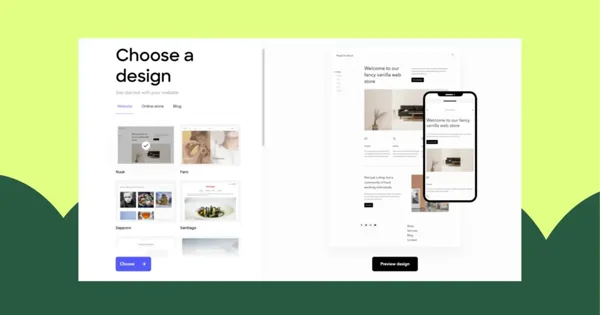
We've created Edicy design templates so that you'll have this tough part — initial site structure and default content — in place right away. On the basic level most of the websites are very similar.

Here's our universal cheat sheet for your website's structure that's reflected also in any of our designs.

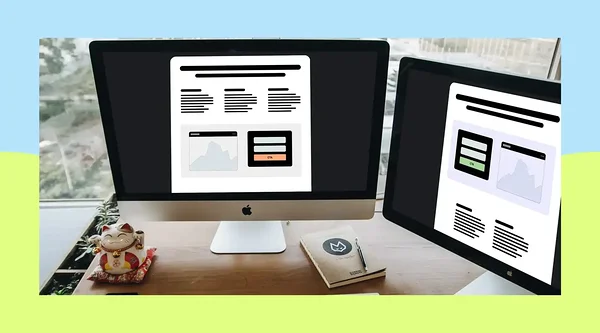
Main landing page.

This is 
  • Company name or logo.
  • Headline or slogan (describing what you are, do or sell).
  • A short paragraph introducing the business model or proposal of your company. A good guide to think about reasonable length is: "Does it all fit on a smartphone screen?"
  • Key illustration. It is a very good idea to put an image to the first page that describes what you do. You can find a suitable one from iStockPhoto or some other image stock for a small fee. You might even find a logo icon from there.
  • Menu with links to all second level sub pages and alternative language versions of the website.
  • Footer or sidebar with contact information.

Products or portfolio.

In case you have more than one case study presented or product sold, you should start with a separate page for product or case study listing. Each product or case should then have a separate page so visitors can share a direct link to it. It should feature the name, description, some images and a call to action — e.g order the product or get a quote for a similar product.

Contacts.

Separate contacts page will probably show up in search results if someone Googles you, making you easier to find. You should also keep a short version of your contacts on the footer of every page. Edicy standard themes have a footer with shared content among pages. Enter it on a page and it will be automatically on every page.

Blog or news.

Another important thing besides contacts, that web viewers are looking about you, is how active you are. Inactive websites bring less leads because visitors think the same inactivity might be true for the whole business.

Best way to avoid this perception is to run a news or blog page which you'd update at least monthly. No need to write long novels, your customers just need to know you are doing well. Linking to relevant news pieces in mainstream media spiced with short comments from your behalf will make a good blog post too.

So all you'll have to do now is sign up for Edicy and it will automatically guide you through the process of making your first website in a matter of minutes.

By far the most time- and brain-consuming part of website creation is writing the actual content in a well structured and interactively illustrated manner. It looks like a super tough job even to start with. And if someone finally does, he's in constant fear of blowing up his site — because all the tools are so damn difficult. But are they really? 

I'm going to give you some quick tips to thoroughly lighten up your way through content creation. My advice is based on 1,5 years of day-to-day work assisting users from around the world in their website building efforts.

Managing site structure

Site structure.

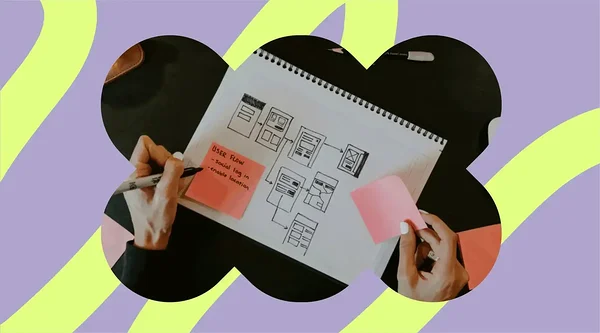
Each of Edicy's design templates sports a pre-made site structure with some sample content for main page, products and contacts. We've tried to keep it simple and logical, applicable to the majority of small companies.

You can easily add both new pages or even duplicate your site structure into new languages.

Content blocks.

Each page in your site structure consists of some parts that you can edit and some that are pre-determined by design. Editable parts are called content blocks, which can be either a text area, a gallery or a form. You can combine them depending on what information you want to provide to the visitors of that particular page. Get more useful content editing tips from our FAQ page.


When adding text or photos to your site it would be useful to have more than one content block per page – this way you can reorder their locations very easily once such necessity arises.

Edicy image editing tools

Managing photos.

You can show pics on your site either by dragging them into any rich text area or by creating a separate gallery content block.

All the photos on your site can be edited right inside the browser after you've dragged them into a rich text area. You can crop, resize and rotate them. Large photos can be optimized for web right after you've inserted them into text area.

Please keep in mind that once you've changed a photo in one place, it will be changed in all of its locations. If you need different behavior, just upload the same pic for each different location.

File naming conventionsTo distinguish between the photo versions it would be wise to also name the file accordingly. For example john_doe_thumbnail.jpg and john_doe_large.jpg etc. To see all your photos in a single list, go to yourname.com/photos while logged in.

Setting up galleries.

Use galleries if you want to show more than one picture in a row. Pics placed into a gallery can't be edited the way you can edit pics inside text areas. Photos will appear in their original size and you can't crop or rotate them. It's therefore wise to edit your gallery pics in your computer before uploading them to Edicy. It's just easier to work with them that way. You'll find some useful programs for that around the internet.

Saving your edits.

Edicy saves all your edits automatically every few seconds. If you are faster than that, you can also save manually by hitting Ctrl+S or clicking the 'Save' button down below on the right-hand side of the main menu bar. 

Updating your browser.

Please don't forget to update your browser every now and then as this will ease up your life a lot. Old browsers are less secure, slower and they are less capable tools for using any webservices like Edicy. It's rather easy to upgrade and the whole internet is going to look and feel better.

Have you ever worried that one of your sub contractors working on your site will accidentally change subscription or site design without your approval? Well, worry no more. We've just introduced editor and site owner roles in Edicy.

Edicy allows collaborative website building and editing.

Editors can do only things that Edicy is intended to do — edit site content and nothing more. They do not have an option to manage subscriptions or domains. This means that they also won't receive renewal notifications from us — which, in turn, is gentle on their inboxes.

From now on, every person added to your site will be in editor role by default. To change one's role, just click on "Edit" link next to the person's card in the people screen and click on "Make account owner" link on the right-hand side of person's edit screen.
Today, we made it possible to add titles to the photos in galleries. Along with this oft-requested change we rolled out several improvements to picture and file management.

Adding a title to a photo in Edicy

Adding or editing photo titles follows the same approach as everything else in Edicy — you can edit everything on spot, right where your site visitors will see it. To add (or change) title under a photo, just click on it in the gallery. You'll see the photo in large size along with a placeholder saying "Title goes here". Type title in, save it and you are done. Site visitors will now see the new title when viewing the pic in full size.

Edicy renewed file panel

You might also notice that file panel is much faster than before. We've rebuilt most of it internally to increase speed, stability and ease of use. We've ditched the old clumsy file filter that did not work well when you had lot of files. It is replaced with simple search box that lets you find any of your files in Edicy by name.

Besides being Edicy front end developer I'm also an avid photographer. Over the course of the last 15 years I've taken hundreds of thousands of shots.

Even after deleting 90% of them the same day through tough self-censorship, the remaining archive takes up thousands of gigabytes of storage. And the amount is growing fast — improving camera technology has resulted also in a steep increase in file sizes.

Loosing even part of these photos would be a first grade disaster. There are millions of people like me — keeping vast amounts of photos almost entirely in digital format and trying to figure out the best way for them to survive till eternity.

Here's what I've learnt along the way.

Broken compact disks (CD)

Issues with optical media

In the early 90's when blank CDs arrived, manufacturers declared that all your digital data storage and archival problems will be solved with optical media. The lifetime of CDs was predicted to reach far beyond 40 years. Now, more than 20 years later people are discovering their precious data on the very same CDs has vanished. Seems like all these proclaims were nothing more than just a marketing hoax after all.

Now after quite some years have passed since blank optical media was released for the masses, several real aging studies have been performed regarding its lifetime. On average it is said that about 90% of data is intact on CDs after 10 years of archiving in good conditions. Though it must also be said that some good quality CDs have kept their data in ideal conditions for more than 20 years. The key question is, what defines a good quality CD?

The manufacturers, out of the production line, quality is not the only factor to consider. Temperature fluctuations, light and physical forces all decrease optical media lifetime. Transportation and storage conditions (including position: vertical is better than horizontal) of your local merchant also play a vital role here, not to mention your own storing conditions. It also seems that data on a disc, from the same patch and manufacturer, burned in one cd burner outlives the other one burned in a different one. If you change the manufacturer of disc the situation can be reversed. Burners thus prefer some media over the other with no apparent reason or logic. Data on optical medida is becoming also more dense with the introduction of DVDs and blue-ray discs and manufacturing processes are changed on daily bases. Any predictions on lifetime of current optical media has actually no bases whatsoever.

The good qualities of optical media like no possibility to accidentally overwrite, no effect of static electricity and magnetic fields on data and smallest probability of getting stolen in case of burglary, become shaded by the fact that no warranty can be applied on its lifetime. As a second or third backup solution they might be quite feasible.

Hard discs are having hard time starting up.

Magnetic storage seems as another quite feasible solution of storing data. The data on the magnetic plates of hard discs seems to outlive the technological advances in times that are forcing you to update your media under your data. Floppies are practically extinct and there are already difficulties to find a computer to get your data out of IDE hard-discs (not to mention SCSI). The commonly introduced problems of static electricity, magnetic fields and ease of physical damage can really be minimized with good storage conditions.

Broken hard disk (HDD)

All this might seem quite ok if there weren't a quite enormous „but“ in all this. The electric motors driving hard discs have a very high failure rate when starting up after standing on the shelf in one position for a prolonged time of, lets say, years. They are built for constant movement, not for standing inanimate. You could power them for storage but that would in turn open up the possibility of all kind of electrical damage and physical wear. 

Using hard discs as a backup solution is quite good option using an external raid rack protected from outside electric fluctuations with a good UPS. This in turn makes the price go high and still does not give a full warranty considering electrical failures and chances of burglary.

What about memory sticks, memory cards and other solid state media?

Broken SDHC memory cardThe construction on solid state media, that stores one bit of data can be described as a battery being charged or not. We all know that a charged battery can go dead after some time, even if not used. This applies to the bit stored on solid state media too. The depletion of the bit is said to occur in about 10 years average. Users have reported even 15 years of storage without problems. Manufacturers give their best flash products maximum 5-year warranty. It's a safe bet to assume that you can extend their lifetime by a magnitude by simply rewriting the data — that is refreshing the electrical charge — every 5 years.

The only problem is that we do not have very much real life data to back this up and some scientific studies say oxygen in the air can affect the discharge rate of these little batteries. So more than ten years on the shelf, even if recharged on regular basis, might still reveal some unpleasant surprises in the future. While memory sticks seem to survive washing machines and trucks riding over them, keep them away from static electricity. An air balloon or synthetic cloth can easily do the damage trucks cannot.

Storing online.

The data stored online in the cloud has actually the highest chance of survival. Online backup service providers keep copies and constantly upgrade the media under your data on a regular basis for you. Cost is a concern though. There are quite good ready solutions fo storing massive amounts of data online. If it is your second backup where data access is rarely needed (only in case the first solution has failed), costs can be rather low too.

Amazon glacier is one good example. You pay only 0.01$ per GB in month. No pay for adding data. If you want to cut the costs there are some things to know though before setting up and testing, You pay if you want to retrieve your data and the pricing scheme is complicated. You might be presented with an enormous bill if you download too fast or your files are very big. You might want to read the Wired article and some forum posts first. Apps are available for simplifying backing up to this service.

Online storage nuclear explosion

Online storage is not without risks too. Extreme forces of nature like tsunamis and earthquakes can destroy your providers servers where your data is in. Storing data in multiple locations by the provider usually means additional costs. In addition economic an political decisions can render your provider non-existent faster than you can react.

Megaupload saga is one example of this case. So choosing a provider who is globally and politically connected is a good start. We think Amazon might be one of the options to consider, as government data of USA is stored in these servers as well, thus making it less likely to be shut down without a pre-warning.

How to keep your data?

Whatever solutions you choose to keep your data, there are some basic rules:

  • Never rely on one solution and have at least one additional backup of your data in a different location on different media.
  • Upgrade the media under your data on a regular basis (online solutions do that for you. You should monitor their financial and political background).
  • The file formats of your data can become obsolete too. Programs available for specific formats become extinct. Updating your data from old formats to newer ones from time to time is a good idea.

Digital data preservation needs constant involvement. Otherwise your grandma's old negatives have a fair chance of outliving your last holiday photos.

Take a look at what our team members were chatting about in the last couple of weeks. Useful tips, nifty apps and more.


Useful tools

  • Paperkit.net – free source for graph, lined or dotted paper. Adjust it to fit your needs and download it.
  • Foundation – recommended responsive front-end framework. It really is great, guys!
  • MapBox – design maps in the cloud, publish in minutes.
  • Typecast – find the best font with an absolute ease.
  • Bitcasa – storage, storage and storage. You´ll never run out of it.

Facts and stories

  • Flash vs html5 – is there a winner or can we really love them at the same time?

CSS tricks and tips

  • FF Chartwell – type in numbers and generate charts that used to take hours to create.

Website lifecycle on Edicy.Didn't find a suitable website design from our theme gallery? Tired of your old design? Do you need a specific functionality, layout or structure? Don't worry, our growing list of partners would gladly help you out with all your customization wishes.

There's no need to depart from Edicy once your requirements grow. Edicy is useful from one-man bands to 1000-employee companies. These are companies spanning 9 countries who have built their websites on Edicy and it's now easier than ever to join the movement.

We have added a direct link to the design theme panel for ordering a custom design from our partners:

Ordering design from Edicy partners.

We've also launched a coaching program to help design agencies get started with Edicy. Even though it's easier to build sites with Edicy compared to Wordpress, the program teaches best practices, tips and tricks for creating advanced websites. During the first month of its existence, there are already 8 agencies that have graduated the coaching program. Join us!

More reading about custom website building on Edicy:

This time we deliver a reading list with a bit of everything: cool products, useful tools and interesting news. Have a top weekend!

Web development 'news'


Online web development tools

  • Am I Responsive – test your site simultaneously on different screens.
  • WYSIHTML5 – open source rich text editor based on HTML5.
  • Nice Nice JPG – the only image placeholder service on the web bringing you nothing but Vanilla Ice jpgs.

Nifty devices for your Mac

  • MacDock – the first docking station for the MacBook that is Apple-design worthy.
  • MiniDrive – increase the available memory in your MacBook.
Another week, another list. This week you can find some less tech-savvy links and reading. Something for everyone.

For everyone

  • Mailbox – control your mailbox the way you have never done before. Only downside is the "minor" queue to get it.

  • Isotope – for creating dynamic box-based layouts.

  • Adobe Edge Reflow – great tool for designing responsive web for several screens at once.

For web developers


Several have asked when and how it would be possible to get new templates available on Edicy.

One option is to let any designer or agency in the world to build a exceptional custom design for you. There's already a number of companies with experience in creating websites on Edicy. They can also import an existing website or a Wordpress template onto Edicy easily.

Earn $500
If you are a designer, there's always an option to create an Edicy theme yourself. Here's a checklist — the Edicy standard theme definitionUse it as your reference point. In case you need our assistance we'd be glad to help you. Just send us an email and we'll guide you through.

Now, if you are great at what you do and want to make this theme available to other Edicy users too, show it to us. We are offering to buy really great Edicy themes with complete PSDs for $500 a piece.
Older articles
Hide older articles
Feb 08, 2013

Weekend reading list vol.1Priit

Feb 06, 2013

Three new design themes in EdicyTõnu

Feb 05, 2013

Churn, the arch enemy of subscription servicesTeet

Feb 04, 2013

Making cool QR codesOliver

Jan 28, 2013

Open-source design templatesPriit

Jan 16, 2013

Introducing Edicy Developer SiteTõnu

Jan 15, 2013

Manage the DNS settings of your domains in EdicyTõnu

Jan 11, 2013

Update to catalogues, part 1.Priit

Jan 10, 2013

New code editor for creating unique website designsOliver

Jan 09, 2013

Velvet Creative Alliance to build websites on EdicyTõnu

Oct 17, 2012

Making Edicy easier for first-time usersTõnu

Oct 01, 2012

Fresh, more flexible pricing plansTõnu

Sep 17, 2012

Building wiki or intranet on EdicyTõnu

Aug 21, 2012

Edicy: one size fits manyRait

Aug 08, 2012

Did you know there's support available at Edicy?Rait

Jul 05, 2012

Edicy will help you speak in your customers' languageRait

Jul 02, 2012

How to launch an effective search marketing campaignElor

Jun 26, 2012

Less-known advantages of responsive website designPriit

Jun 20, 2012

Team behind Edicy: Oliver Pulges Tõnu

Jun 19, 2012

Using widgets to boost the functionality of your websiteRait

Jun 18, 2012

File upload support comes to iPadPriit

Jun 13, 2012

Hello, yourname.edicy.co!Tõnu

Jun 12, 2012

Team behind Edicy: Rait PartsTõnu

May 09, 2012

Password protected pagesPriit

Apr 26, 2012

Done: in-app notifications and an intro videoTõnu

Apr 18, 2012

New design theme and other updatesTõnu

Mar 14, 2012

Trial version of Edicy, minor improvements along the wayPriit

Mar 01, 2012

Small, useful updatesPriit

Feb 16, 2012

Edicy this week: free domains, deeper insights and more designsTõnu

Feb 01, 2012

Latest Edicy updates: more local domains on sale, monthly site reports, improved galleries and searchTõnu

Jan 13, 2012

New way to build forms and collect feedbackTõnu

Jan 05, 2012

Updates in language managementPriit

Dec 12, 2011

Discover Small Things That Work Wonders Using Google Analytics Flow Visualization Alex

Dec 08, 2011

New design themesPaavel

Oct 12, 2011

Edit websites on iPadPriit

Oct 11, 2011

Edicy Statistics EngineTõnu

Sep 05, 2011

Edicy featured in Der SpiegelTõnu

Jul 27, 2011

Improved web address search, .de and .me now for salePriit

Jun 08, 2011

Why hosting a website on your own sucksTõnu

Jun 02, 2011

Edicy design themes going mobileStepan

May 26, 2011

Better on-site editingTõnu

May 05, 2011

Free domain namesTõnu

Apr 28, 2011

Pro designsTõnu

Apr 19, 2011

Updated text and image editorPriit

Apr 18, 2011

Software or service?Tõnu

Apr 15, 2011

Improved link toolPriit

Apr 08, 2011

Designers and developers get better template editorPriit

Mar 29, 2011

Reaching financial freedomTõnu

Mar 24, 2011

Better switching between sitesPriit

Mar 23, 2011

Exceptional websites on EdicyTõnu

Mar 21, 2011

Latest updates to EdicyTõnu

Mar 11, 2011

Create product catalogues with EdicyTõnu

Feb 25, 2011

Maintanance timeTõnu

Feb 16, 2011

Languages. A sequelTõnu

Feb 01, 2011

More languages updatedTõnu

Jan 19, 2011

Edicy, as seen by the World MediaTõnu

Jan 12, 2011

Deeper localization for NetherlandsPriit

Jan 12, 2011

Why are we in a web service business in the first place?Tõnu

Jan 06, 2011

Choices behind the new designTõnu

Jan 05, 2011

Languages updatedTõnu

Dec 29, 2010

Maintenance release for the new EdicyPriit

Dec 15, 2010

Introducing the new EdicyTõnu

Nov 04, 2010

First sneak peek into Edicy 2.0Tõnu

Nov 01, 2010

A better way to create websitesTõnu

Oct 23, 2010

Congratulations! You've finished your website. Now what?Tajo

Oct 13, 2010

Creating a multilingual websiteTõnu

Oct 11, 2010

Improving your Google PageRank with EdicyTõnu

Oct 10, 2010

Add your site to Google search resultsTanel

Oct 08, 2010

Reorder pics in galleryTõnu

Sep 15, 2010

Tallinn design welcomes new usersTõnu

Jul 29, 2010

Drag and drop file uploads on EdicyPriit

Jul 19, 2010

Folks helping to make stunning websites on EdicyTõnu

Jul 14, 2010

Nature Calls: a selection of eco-websites on EdicyArlene

Jul 08, 2010

Website building in the cloudTõnu

Jun 08, 2010

Edicy's business in a nutshellTõnu

Jun 04, 2010

Publishing, simplifiedPriit

May 26, 2010

Say hello to our community / support forumTõnu

May 05, 2010

Revamped content areasPriit

Apr 19, 2010

What is Alexa Traffic Rank?Tõnu

Apr 17, 2010

What is Google PageRank?Tõnu

Apr 16, 2010

Google PageRank & Alexa Traffic Rank now in EdicyTõnu

Apr 01, 2010

Edicy introduces AutomaticWebCreator™Tajo

Mar 05, 2010

Edicy speaks better French now!Tanel

Jan 22, 2010

Updates in file managementPriit

Dec 31, 2009

How to start a business with (almost) no costTõnu

Dec 23, 2009

Edicy is now available in Polish!Tanel

Dec 18, 2009

Switch between your websitesTõnu

Dec 17, 2009

Edicy Pro users get 5 GB of storageTõnu

Dec 09, 2009

Renew purchased domains in EdicyPriit

Dec 08, 2009

Fresh cleanups: emails and dialoguesTõnu

Nov 15, 2009

IntermissionTõnu

Oct 08, 2009

100,000th page created with Edicy!Kajar

Sep 30, 2009

Looking for first-to-see eyesPriit

Sep 21, 2009

We've moved serversKajar

Sep 17, 2009

Edicy won the grand prix at Estonian Internet Awards!Tõnu

Aug 21, 2009

How to get feedback from your users by using Edicy formsKajar

Aug 15, 2009

How to squeeze most out of the designs, pt. 2Tajo

Aug 10, 2009

Leave IE6 alone!Priit

Aug 03, 2009

How to squeeze most out of the designs, pt 1Tajo

Jul 31, 2009

Edicy designer toolkit has been releasedPriit

Jul 31, 2009

Edicy turns one!Tõnu

Jul 27, 2009

More web addresses now available at EdicyKajar

Jul 23, 2009

Edicy adds Finnish to its languagesKajar

Jul 21, 2009

How to create a great website, pt 6: Increasing trafficTõnu

Jul 16, 2009

Edicy is now available in Dutch!Tanel

Jul 14, 2009

How to create a great website, pt 5: Building functionalityTõnu

Jul 10, 2009

Announcing: Edicy affiliate programKajar

Jul 08, 2009

New toolbar and other improvements: release notes for July 8th 2009Kajar

Jul 03, 2009

How to make your website show up on GoogleTanel

Jun 16, 2009

First Edicy screencast is upKajar

Jun 11, 2009

Getting widgets on your website with Edicy pt. 1Kajar

Jun 05, 2009

Building a multi-language website with EdicyKajar

May 28, 2009

Maintenance release notes for May 27, 2009Priit

May 27, 2009

Who's using Edicy?Kajar

May 18, 2009

Edicy to be incubatedKajar

May 12, 2009

Edicy got a speed boost, Release notes for May 12, 2009Priit

May 07, 2009

How to create a great website, pt 4: Creating designTõnu

May 04, 2009

Help us translate Edicy!Tanel

Apr 30, 2009

How to create a great website, pt 3: Writing contentTõnu

Apr 23, 2009

How to create a great website, pt 2: Gathering teamTõnu

Apr 20, 2009

How to create a great website, pt 1: IntroductionTõnu

Apr 14, 2009

Build forms with Edicy, Release notes for April 14, 2009Priit

Apr 02, 2009

Have a great design. Edicy design examples renewedTõnu

Apr 01, 2009

Edicy going Internet Explorer onlyTajo

Mar 24, 2009

Management of content areas improved. Release notes for March 24, 2009Priit

Mar 17, 2009

To publish or not to publish - You decide!Priit

Mar 17, 2009

Table editor is now available in Edicy. Release notes for March 17, 2009Priit

Feb 08, 2009

Media sets, form-to-mail, a lot of fixes. Release notes for Feb 8, 2009Tõnu

Jan 20, 2009

Add forms and receive feedback. Release notes for Jan, 20Priit

Jan 13, 2009

See your site traffic in EdicyPriit

Jan 11, 2009

Want more Edicy? Find out how to tell usTanel

Jan 07, 2009

Edit images and add maps to your site! Release notes for Jan 7, 2009Priit

Dec 23, 2008

Interview with Tõnu Runnel at ArcticStartupPriit

Dec 22, 2008

Local domains and design treats. Release notes for Dec 19, 2008Tajo

Dec 19, 2008

Design, art and usabilityTõnu

Dec 17, 2008

Improve your site's visibility in Google search results. Release notes for Dec 16, 2008Tajo

Dec 14, 2008

A merry-go-round of hope: world's start-up scene at Le WebTõnu

Dec 10, 2008

Galleries in beta! Release notes for Dec 10, 2008Tajo

Dec 09, 2008

Greetings from Paris!Tõnu

Dec 03, 2008

Edicy design documentation is now available!Priit

Dec 02, 2008

Release notes for December 2nd, 2008 — More design choicesMartti

Dec 01, 2008

Edicy.com — new lookTõnu

Nov 16, 2008

Edicy at LeWeb finals!Tõnu

Nov 11, 2008

Release notes for November 11th, 2008 — Domain registrationTajo

Oct 30, 2008

Release notes for October 30th, 2008 — Download your siteTajo

Oct 28, 2008

Edicy designs around the worldPriit

Oct 27, 2008

Release notes for October 27th, 2008 — Improved paymentsTajo

Oct 20, 2008

Release notes for October 19th, 2008 — PublishingMartti

Oct 19, 2008

Edicy now with more power!Priit

Oct 18, 2008

Joonathan Mägi joins EdicyTõnu

Oct 17, 2008

Postcards from our office vol. 4 - Drawing EdicyTajo

Oct 12, 2008

Release notes for October 10th, 2008 — External mediaMartti

Oct 05, 2008

A selection of remarkable sites built on EdicyTõnu

Oct 01, 2008

Release notes for September 30th, 2008 — Sign in made easyMartti

Sep 24, 2008

Release notes for September 23rd, 2008 -- major improvements this weekMartti

Sep 17, 2008

Release notes for September 17th, 2008Martti

Sep 10, 2008

Martti Ilves takes over Edicy Quality Assurance teamTõnu

Sep 10, 2008

Release Notes for September 9th, 2008 – German language added and page optimization improvements.Andres

Sep 09, 2008

Edicy featured in Estonia’s top business newspaperAndres

Sep 04, 2008

Welcome aboard Tanel Jakobsoo!Andres

Sep 03, 2008

Release Notes for September 2nd, 2008 – Cross page content and lot's of fixes.Andres

Aug 29, 2008

Hæ Ísland - Edicy is now available in Icelandic!Andres

Aug 28, 2008

Edicy Pro for business users takes offTõnu

Aug 27, 2008

Release Notes for August 26, 2008 – Edicy Pro and more.Andres

Aug 20, 2008

Release notes for August 20th, 2008 - Create your own custom designAndres

Aug 18, 2008

Starman: first publicly listed company to use EdicyTõnu

Aug 13, 2008

Release Notes for August 12th, 2008Andres

Aug 11, 2008

Edicy is now available in Chinese!Andres

Aug 06, 2008

Release Notes for August 5th, 2008 – More designs and directing your domain name to Edicy.Andres

Aug 05, 2008

Postcards from our office vol. 3 - Edicy release partyTajo

Aug 01, 2008

Priit Haamer – Co-founder and Chief Developer.Andres

Jul 31, 2008

Edicy reaches Public BetaTõnu

Jul 29, 2008

Tõnu Runnel – Co-founder, CEO and head of designAndres

Jul 24, 2008

New website, new blog, new lookAndres

Jul 24, 2008

Release notes for July 22nd, 2008 – New website and more updatesAndres

Jul 21, 2008

More introductions – Say hello to Dima, our bug killerAndres

Jul 17, 2008

Release notes for July 17th, 2008 – Feedback, lot’s of feedbackAndres

Jul 15, 2008

Edicy opens up (a little)Andres

Jul 12, 2008

Service downtime reportPriit

Jul 10, 2008

Say Hello to Markus Paks!Andres

Jul 09, 2008

Release Notes for July 8th, 2008 - More features, more usersAndres

Jul 07, 2008

How to get hired (and how not to)Tajo

Jul 02, 2008

Welcome on board, Andres Sehr!Tõnu

Jul 02, 2008

Release Notes July 2nd, 2008 - All hands on deckAndres

Jun 27, 2008

Release notes for June 25th – Holiday editionAndres

Jun 24, 2008

Sabbath LawPriit

Jun 19, 2008

Fraktal is hiring!Tõnu

Jun 17, 2008

Edicy continues to take shapeAndres

Jun 10, 2008

Release notes for June 10, 2008 Fraktal

Jun 05, 2008

Even a monkey could do it? Right?Tajo

Jun 03, 2008

Release Notes for June 3rd - Multi-lingual support now added. Fraktal

May 27, 2008

Release notes for May 27, 2008Fraktal

May 26, 2008

Why would anyone want to ride a crowded bus?Tõnu

May 21, 2008

Release notes for May 21, 2008 – Blog tool improvements.Fraktal

May 15, 2008

Release quickly even if it's bigTõnu

May 14, 2008

Screenery-greeneryPriit

May 13, 2008

Release notes for May 13, 2008Fraktal

May 11, 2008

Blodcasting with EdicyPriit

May 08, 2008

Postcards from our office vol. 2Tajo

May 08, 2008

Blogging simplifiedTõnu

Apr 29, 2008

Fraktal switches to EdicyTõnu

Apr 25, 2008

Release notes for Apr 25, 2008.Fraktal

Apr 17, 2008

Updates on EdicyPriit

Apr 17, 2008

Postcards from our office Tajo

Apr 15, 2008

Release notes for Apr 15th - A first peak for a select few.Fraktal

Apr 10, 2008

A fresh way to log inTõnu

Apr 09, 2008

Crash-boom-bang!Priit

Apr 02, 2008

Edicy does 1999 Tajo

Apr 01, 2008

A maze called "Naming Your Software" Tajo

Mar 27, 2008

Launch! Edicy reaches private betaTõnu

Mar 12, 2008

How we're workingPriit

Mar 10, 2008

First look at our web editorTõnu

Feb 27, 2008

How to build a seamless website editor?Tõnu

Feb 26, 2008

Private beta to be launched in mid-MarchTõnu

Feb 22, 2008

Release notes for February 22nd, 2008Fraktal

Feb 17, 2008

First site running on our web-serviceTõnu

Jan 21, 2008

Release Notes for Jan 21st - First Edicy release!Fraktal

Edicy blog

Life behind the simplest web creation tool


Recent Buzz