

Designers and developers get better template editorApr 08, 2011
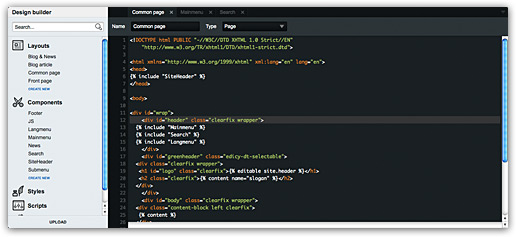
- It is now possible to insert pictures into photo gallery at any position
- When changing language in login form, username and password will not get lost
- Visual improvements of Edicy user interface in Opera web browser
- Fixed issues with design editor height calculation
- Fix for site switcher in admin views where it was not possible to pick first site in the select menu
No replies to this post
- Thomas Apr 11
Bravo !
- Henn Apr 12
bye-bye, notepad
- Agri Apr 13
Thank you, this is very great - now more easy to find code line for editing and see syntax errors.
- Thomas May 04
Just tested. Very well executed.
Love the flashing green cursor and the colours.
Gives enjoyment to the work.
I guess Priit had great time developping it. - Tõnu May 05
Thanks :) Just love to get such feedback.
- Robert Jun 14
It does not have "seach" function or at least I can't find it. Browser ctrl+f (on Chrome at least) can only look through the part of the code that is visible on screen and can't reach all other lines that are visible after scrolling.
Will there be search function and when ? Making browser ctrl+f seach possible would be pretty helpful :) - Tõnu Jun 20
Actually ctrl+f opens a javascript search box that works well with our , just tried myself. Finds what you are looking for. The problem is with browser's native search box — this doesn't look under hidden parts of canvas. Don't use it :)
- Jessica Smith Jun 22
After being in relationship with Wilson for seven years,he broke up with me, I did everything possible to bring him back but all was in vain, I wanted him back so much because of the love I have for him, I begged him with everything, I made promises but he refused. I explained my problem to someone online and she suggested that I should contact a spell caster that could help me cast a spell to bring him back but I am the type that don’t believed in spell, I had no choice than to try it, I meant a spell caster called Dr Zuma zuk and I email him, and he told me there was no problem that everything will be okay before three days, that my ex will return to me before three days, he cast the spell and surprisingly in the second day, it was around 4pm. My ex called me, I was so surprised, I answered the call and all he said was that he was so sorry for everything that happened, that he wanted me to return to him, that he loves me so much. I was so happy and went to him, that was how we started living together happily again. Since then, I have made promise that anybody I know that have a relationship problem, I would be of help to such person by referring him or her to the only real and powerful spell caster who helped me with my own problem and who is different from all the fake ones out there. Anybody could need the help of the spell caster, his email: spiritualherbalisthealing@gmail.com or WhatsApp him +15068001647 blog: spiritualherbal.blogspot.com you can email him if you need his assistance in your relationship or anything. CONTACT HIM NOW FOR SOLUTION TO ALL YOUR PROBLEMS
- Roshima Laken Jul 06
It is a very hard situation when playing the lottery and never won, or keep winning low fund not up to 100 bucks, i have been a victim of such a tough life, the biggest fund i have ever won was 100 bucks, and i have been playing lottery for almost 12 years now, things suddenly change the moment i came across a secret online, a testimony of a spell caster called DR EMU, who help people in any type of lottery numbers, i was not easily convinced, but i decided to give try, now i am a proud lottery winner with the help of DR EMU, i won $1,000.0000.00 and i am making this known to every one out there who have been trying all day to win the lottery, believe me this is the only way to win the lottery.
Contact him via email Emutemple@gmail.com
What's app +2347012841542
Https://emutemple.wordpress.com/ - Dexter Tamara Jun 06
My mom was suffering from Type 2 diabetes and Lupus for over 17yrs. She tried many drugs but at last became dependent on saferoom and metformin due to the weakness and constant pains, She found that life was just sinking & there was no way of hope. Then she consulted Chief Dr Lucky for herbal treatments, Which she had been hearing so much about, After some couple of days taking this herbal medicine, Things started to change, The symptoms started to decrease and after 19 days of taking it, She became healthy and fully free from all the symptoms of Type 2 diabetes and Lupus. My mom's life is totally different now. That's why I decided to let everybody know about the wonderful healing of Chief Dr Lucky herbal, If you are having any health challenges kindly visit email chiefdrlucky@gmail.com or WhatsApp +2348132777335
Facebook page http://facebook.com/chiefdrlucky
Website https://chiefdrlucky.com/. - Gavin Wear Jul 02
I am here to spread this good news to the entire world on how Dr Emu helped me solve my infertility problem and i am so happy now that i am now a mother because for over 4 years i have been trying to get pregnant and needed help, i and my husband always go for medical check up and the doctor always say that the both of us are fine and i have nowhere else to get help from and all hope was almost lost until one day i visited a friend of mine and i told her what i was passing through and she introduce me to this great spell caster called Dr Emu who helped her when she was in need of help, so i took a try to contact Dr Emu through his email and i explain all my problem to him and after we have talked he perform an infertility spell for me and after that he told me what i should do, and i followed the instruction he gave and after that he instructed to sleep with my husband and also i followed the instruction and he said that the next week i should go for medical check up and the doctor confirmed that i was 4 months pregnant and i was so happy that all my sorrows were gone for ever, i am so very happy now and also if you need any kind of help or the same line with mine, contact Dr Emu on his email: emutemple@gmail.com or call/text his whatsapp phone number +2347012841542 visit facebook page: https://web.facebook.com/Emu-Temple- 104891335203341